OSI (Open System Interconnection) model was introduced by ISO(International Standard Organization) in 1984.
The Main reason behind this was by that time their were two IT firm Apple and IBM and they were not able to communicate with each other. They could communicate within their company but outside the company was not allowed for both the IT firm.
The Open Systems Interconnection model (OSI model) is a conceptual model using which one can say the flow or working of the network.
It would be difficult for anyone to explain the set of actions on how the internet works without the help of OSI model.
OSI Model has 7 Layers
Layer 1 Physical and Layer 7 Application.
Layer 7 to 1 (Application to physical ) is called encapsulation and layer 1 to 7 (Physical to Application) is called de-capsulation.
Encapsulation is adding (Appending) the content in each layer. De-capuslation is just reverse of encapsulation.
Shortcut to remember the seven layers of OSI model is Please Do Not Take Sales Person Advice
Application layer: This layer is where user interaction takes place.This layer lies between the actual application that provides network access and the lower layer.
Presentation layer:This layer takes care of how the data should be represented.for example text and images are two major format that we see in any websites. Content of these two formats are basically a sequence of 0's and 1's .This layer takes care on how the data should be represented with which format.
Session Layer : As the name suggests ,we can guess this layer is responsible for all session activities between client and the server for example if the bank websites are left idle for 180 seconds the session for that particular transaction is terminated.
Transport Layer: The data from source to the destination are not sent at once as whole. The data is divided into small chunks of data and they are numbered in transport layer at the sender's end.At the receiver's end these small chunk's of the data are arranged and converted back into single data.These numbered chunks of data at transport layer are called as segment.Transport layer also takes care of error detection process.
Transport layer works on two main protocol
- TCP(Transmission Control Protocol)
- UDP(User Datagram Protocol)
Protocols are nothing but a set of rules to be followed by client and server in order to make the communication safe,reliable and secure.
TRANSMISSION CONTROL PROTOCOL (TCP):
Transmission Control Protocol (TCP) is a reliable service. i.e., each information sent and received between the end devices will be acknowledged, so that if any particular information is dropped in between them, acknowledgement will fail and as a result that particular information will be re-transmitted automatically making sure that the information is delivered to the destination. This is the core logic behind the TCP protocol. This feature makes the TCP protocol unique and most of the applications in today’s world uses TCP, Also TCP is connection oriented protocol i.e before the data transmission begins connection establishment must take place and this process is also referred as the Three-way handshake.
The Three-way handshake ensures that there is proper connectivity between the hosts after which the connection is said to be established. The TCP does windowing and flow control as well.
Applications like Web Browsers, Chat clients, Email clients are the few examples that work on TCP.
USER DATAGRAM PROTOCOL (UDP):
On the other hand, User Datagram Protocol (UDP) is an unreliable service i.e. the end devices won’t care about the delivery status. UDP is a connection less protocol which doesn’t establish any connection before transmitting the data. This protocol is widely used in the field of real time activities. Real time activities in the sense, actions like live video streaming, voice & video calling etc. For a real time example recall the Skype
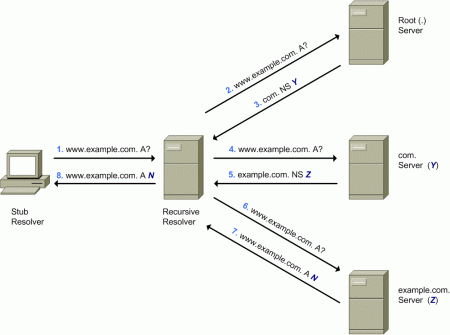
UDP is also used for bootstrapping and DNS requests.
Skype, Viber, Live telecast are the few examples of UDP.
Network Layer: IP addresses and routing are taken care by this layer. This layer has two fields. Source IP address and the Destination IP address. A segment along with the source IP and destination IP is called the packet. Packet is the layer 3 data unit. Whenever you visit a web-page two things will happen, a request and a reply. You will request the server for its web-page and the server will send you its web page as a reply.
Let us say, you visit www.google.com. In the request you send, the source IP address will be the IP address of your computer and the destination IP address will be the Google server IP address. During the reply from the server the source IP address will be the IP address of the Google server and the destination IP address will be the IP address of your computer.
Routers and L3 switches are Layer 3 devices.
DataLink Layer: Like Network layer takes care of IP addresses, Datalink layer takes care of MAC addresses and error detection. MAC stands for Media Access Control. MAC address is a 12 digit hexadecimal address that uniquely identifies every device on the earth.
This layer has two fields. Source MAC address and the Destination MAC address.
Switches are layer 2 devices.
Physical layer:
This layer transfers the data in Bits. This layer takes care of the physical connections like Ethernet cables.Cables and NIC’s are Layer 1 devices.
Thanks for reading,See you in next article!